Showing posts with label charging. Show all posts
Showing posts with label charging. Show all posts
Saturday, October 29, 2016
nokia 100 not charging problem solution
nokia 100 not charging problem solution
If you are facing not charging problem in nokia 100 then this diagram will help you to solve nokia 100 not charging problem.
Nokia 105 not charging solution solution here

If you plug in charging pin into nokia 100 and it show notification of not charging or charger not supported then change the component that is shown in above diagram.
This IC is used to for nokia 100 not charging solution.
Nokia 105 not charging solution solution here
If you plug in charging pin into nokia 100 and it show notification of not charging or charger not supported then change the component that is shown in above diagram.
This IC is used to for nokia 100 not charging solution.
Available link for download

Tuesday, October 25, 2016
Nokia Asha 201 Charging Problem Solution Jumpers Ways
Nokia Asha 201 Charging Problem Solution Jumpers Ways
In nokia asha 201 if it is not charging ok and you have not charging problem in nokia asha 201 then you can solve this problem with help of diagram bellow. in this diagram all charging links are identified so that you can understand which parts are used in charging function in nokia asha 201.
Nokia Asha 201 MIC Jumper Ways Problem Solution

So one print is ground it is identified in diagram with blue color and red cooler is a positive print and you can check all track with meter and if any of them is broken you can apply jumper as defined in repairing diagram.mostly if we plug in charger and it does not show any thing it can be fault of charging base or may be fault of broken link. so check charging base also.
If it shows not charging indication or a message charger not supported then it can be fault of charging ic or may be due to 47k resistance. About these problems I will post in upcoming days.
for more detail and new tips and tricks about cellphone service problem keep visiting this page we will update cellphone service diagrams timely with new cellphone diagrams.some related post are also given bellow you can read them also for more information about cellphone.
Nokia Asha 201 MIC Jumper Ways Problem Solution
So one print is ground it is identified in diagram with blue color and red cooler is a positive print and you can check all track with meter and if any of them is broken you can apply jumper as defined in repairing diagram.mostly if we plug in charger and it does not show any thing it can be fault of charging base or may be fault of broken link. so check charging base also.
If it shows not charging indication or a message charger not supported then it can be fault of charging ic or may be due to 47k resistance. About these problems I will post in upcoming days.
for more detail and new tips and tricks about cellphone service problem keep visiting this page we will update cellphone service diagrams timely with new cellphone diagrams.some related post are also given bellow you can read them also for more information about cellphone.
Available link for download
Monday, October 24, 2016
Nokia C2 08 Not Charging Problem jumpers Ways Solutions
Nokia C2 08 Not Charging Problem jumpers Ways Solutions
1-Nokia C2-08 not charging problem.
2-Nokia C2-08 Do not show charging.
Tools:-
1-Hot Air is required.
2-Solding iron is required.
3-Skrue driver keys.
4-Electronics cleaner.
5-charging base if old one is damage.
6-old board of Nokia C2-08 if a few parts are damage in this board.So that they can be replaced.
7- Charger to diagnostic it.
Nokia C2-02 Ringer Problem Solution Jumper Ways

Solution:-
1-Plugin charging pin in charging jack and check.
2-if charging symbol is not appearing in display it can be fault of missing track pr charging jack.
3-change battery and check again.
4-if Not charging symbol appear on display it can be fault of r22 or 24k resistance.
5-Disassamble Nokia C2-08 and look at whole mother board carefully for rust or carbon.
6-Clean carbon area and the area shown in above diagram with electronics cleaner.
7-Apply heat with hot air so that it can be totally dry.
8-Do not apply to much heat it can be harm for your skin and mobile as well.
9-chek all these tracks as shown in the above diagram and if any path is missing apply jumpers.
10-if parts are missing or damage replace them.
Warnings:
Do not apply much heat it can be harm for your skin and mobile phone.
Try that board get fully dry.
At time of assembling keep in mind about fitting. If fitting is not proper charging jack will not attach and it will not show charging and will not start charging.
for more detail and new tips and tricks about cellphone service problem keep visiting this page we will update cellphone service diagrams timely with new cellphone diagrams.some related post are also given bellow you can read them also for more information about cellphone.
2-Nokia C2-08 Do not show charging.
Tools:-
1-Hot Air is required.
2-Solding iron is required.
3-Skrue driver keys.
4-Electronics cleaner.
5-charging base if old one is damage.
6-old board of Nokia C2-08 if a few parts are damage in this board.So that they can be replaced.
7- Charger to diagnostic it.
Nokia C2-02 Ringer Problem Solution Jumper Ways
Solution:-
1-Plugin charging pin in charging jack and check.
2-if charging symbol is not appearing in display it can be fault of missing track pr charging jack.
3-change battery and check again.
4-if Not charging symbol appear on display it can be fault of r22 or 24k resistance.
5-Disassamble Nokia C2-08 and look at whole mother board carefully for rust or carbon.
6-Clean carbon area and the area shown in above diagram with electronics cleaner.
7-Apply heat with hot air so that it can be totally dry.
8-Do not apply to much heat it can be harm for your skin and mobile as well.
9-chek all these tracks as shown in the above diagram and if any path is missing apply jumpers.
10-if parts are missing or damage replace them.
Warnings:
Do not apply much heat it can be harm for your skin and mobile phone.
Try that board get fully dry.
At time of assembling keep in mind about fitting. If fitting is not proper charging jack will not attach and it will not show charging and will not start charging.
for more detail and new tips and tricks about cellphone service problem keep visiting this page we will update cellphone service diagrams timely with new cellphone diagrams.some related post are also given bellow you can read them also for more information about cellphone.
Available link for download
Nokia C3 00 Fake Charging Not Charging Solution
Nokia C3 00 Fake Charging Not Charging Solution

Nokia C3-00 Fake Charging
Available link for download
Thursday, October 20, 2016
Nokia C3 00 Charging Solution
Nokia C3 00 Charging Solution
Nokia 101 Lcd Light Solution

Nokia C3-00 Fake Charging Solution
Available link for download
Tuesday, October 18, 2016
Sony Ericsson x10 New charging solution
Sony Ericsson x10 New charging solution

Available link for download
Monday, October 17, 2016
New China Charging IC PT116 100 Tested Solution
New China Charging IC PT116 100 Tested Solution

Available link for download
Saturday, October 15, 2016
nokia x1 01 not charging solution
nokia x1 01 not charging solution
if you are facing not charging problem in nokia x101 it can be solve in a few easy steps.Let we diagnose it before solving the problem.Insert charging pin into the mobile phone’s charging base and check the notifications on screen.

If it shows nothing on the screen it may can be cause of charger or it can be due to charging pin damages.While if it shows not charging on the screen it can be the problem of charging ic and parts.
As in above diagram you can see some parts inline with red color to solve nokia x101 charging problem. Look at the above diagram and in it follow steps given on the diagram.
If it shows nothing on the screen it may can be cause of charger or it can be due to charging pin damages.While if it shows not charging on the screen it can be the problem of charging ic and parts.
As in above diagram you can see some parts inline with red color to solve nokia x101 charging problem. Look at the above diagram and in it follow steps given on the diagram.
Available link for download
Friday, October 14, 2016

Tuesday, October 11, 2016

nokia 1280 not charging problem solution
nokia 1280 not charging problem solution
nokia 1280 not charging problem solution 1280 not charging nokia 1280 charging solution nokia 1280 charging ways nokia 1280 not charging problem solution Nokia 1280 not charging jumper nokia 1280 no light problem solution new track ways nokia 1280 charging not save nokia 1280 charging ways jumper nokia 1280 notcharging Nokia 1280 not charging sulotion

so check all these parts that are indicated in this diagram and also check these links with an electronics meter and if you found any of them broken make these jumpers and also you may have to change these parts if not working with upper tricks.
so check all these parts that are indicated in this diagram and also check these links with an electronics meter and if you found any of them broken make these jumpers and also you may have to change these parts if not working with upper tricks.
Available link for download
Sunday, October 9, 2016
Nokia C2 01 Charging Not Supported Hardware Solution
Nokia C2 01 Charging Not Supported Hardware Solution
Nokia C2-01 Charging Problem Solution
Nokia C2-01 Charging Not Supported
.jpg)
Nokia C2-01 Charging Problem Solution
Nokia C2-01 Charging Not Supported
Available link for download
Nokia 6280 6288 Charging Not Supported Solution
Nokia 6280 6288 Charging Not Supported Solution

Available link for download
Thursday, October 6, 2016
Nokia C2 02 Not Charging Problem jumpers Ways Solutions
Nokia C2 02 Not Charging Problem jumpers Ways Solutions
1-Nokia C2-02 not charging problem.
2-Nokia C2-02 Do not show charging.
Tools:-
1-Hot Air is required.
2-Solding iron is required.
3-Skrue driver keys.
4-Electronics cleaner.
5-charging base if old one is damage.
6-old board of Nokia C2-02 if a few parts are damage in this board.So that they can be replaced.
7- Charger to diagnostic it.
Nokia C2-08 MMC Memory Card Problem Solution Ways

Solution:-
1-Plugin charging pin in charging jack and check.
2-if charging symbol is not appearing in display it can be fault of missing track pr charging jack.
3-change battery and check again.
4-if Not charging symbol appear on display it can be fault of r22 or 24k resistance.
5-Disassamble Nokia C2-02 and look at whole mother board carefully for rust or carbon.
6-Clean carbon area and the area shown in above diagram with electronics cleaner.
7-Apply heat with hot air so that it can be totally dry.
8-Do not apply to much heat it can be harm for your skin and mobile as well.
9-chek all these tracks as shown in the above diagram and if any path is missing apply jumpers.
10-if parts are missing or damage replace them.
Warnings:
Do not apply much heat it can be harm for your skin and mobile phone.
Try that board get fully dry.
At time of assembling keep in mind about fitting. If fitting is not proper charging jack will not attach and it will not show charging and will not start charging.
for more detail and new tips and tricks about cellphone service problem keep visiting this page we will update cellphone service diagrams timely with new cellphone diagrams.some related post are also given bellow you can read them also for more information about cellphone.
2-Nokia C2-02 Do not show charging.
Tools:-
1-Hot Air is required.
2-Solding iron is required.
3-Skrue driver keys.
4-Electronics cleaner.
5-charging base if old one is damage.
6-old board of Nokia C2-02 if a few parts are damage in this board.So that they can be replaced.
7- Charger to diagnostic it.
Nokia C2-08 MMC Memory Card Problem Solution Ways
Solution:-
1-Plugin charging pin in charging jack and check.
2-if charging symbol is not appearing in display it can be fault of missing track pr charging jack.
3-change battery and check again.
4-if Not charging symbol appear on display it can be fault of r22 or 24k resistance.
5-Disassamble Nokia C2-02 and look at whole mother board carefully for rust or carbon.
6-Clean carbon area and the area shown in above diagram with electronics cleaner.
7-Apply heat with hot air so that it can be totally dry.
8-Do not apply to much heat it can be harm for your skin and mobile as well.
9-chek all these tracks as shown in the above diagram and if any path is missing apply jumpers.
10-if parts are missing or damage replace them.
Warnings:
Do not apply much heat it can be harm for your skin and mobile phone.
Try that board get fully dry.
At time of assembling keep in mind about fitting. If fitting is not proper charging jack will not attach and it will not show charging and will not start charging.
for more detail and new tips and tricks about cellphone service problem keep visiting this page we will update cellphone service diagrams timely with new cellphone diagrams.some related post are also given bellow you can read them also for more information about cellphone.
Available link for download
Wednesday, October 5, 2016
Nokia C2 06 Not Charging Problem jumpers Ways Solutions
Nokia C2 06 Not Charging Problem jumpers Ways Solutions
 1-Nokia C2-06 not charging problem.
2-Nokia C2-06 Do not show charging.
Tools:-
1-Hot Air is required.
2-Solding iron is required.
3-Skrue driver keys.
4-Electronics cleaner.
5-charging base if old one is damage.
6-old board of Nokia C2-06 if a few parts are damage in this board.So that they can be replaced.
7- Charger to diagnostic it.
Nokia C2-02 Charger Not Supported Problem Solution Ways
Solution:-
1-Plugin charging pin in charging jack and check.
2-if charging symbol is not appearing in display it can be fault of missing track pr charging jack.
3-change battery and check again.
4-if Not charging symbol appear on display it can be fault of r22 or 24k resistance.
5-Disassamble Nokia C2-06 and look at whole mother board carefully for rust or carbon.
6-Clean carbon area and the area shown in above diagram with electronics cleaner.
7-Apply heat with hot air so that it can be totally dry.
8-Do not apply to much heat it can be harm for your skin and mobile as well.
9-chek all these tracks as shown in the above diagram and if any path is missing apply jumpers.
10-if parts are missing or damage replace them.
Warnings:
Do not apply much heat it can be harm for your skin and mobile phone.
Try that board get fully dry.
At time of assembling keep in mind about fitting. If fitting is not proper charging jack will not attach and it will not show charging and will not start charging.
for more detail and new tips and tricks about cellphone service problem keep visiting this page we will update cellphone service diagrams timely with new cellphone diagrams.some related post are also given bellow you can read them also for more information about cellphone.
Available link for download
Tuesday, October 4, 2016
Samsung Galaxy G531H Usb Charging Ways jumper Solution
Samsung Galaxy G531H Usb Charging Ways jumper Solution
Samsung Galaxy G531H Usb Charging Ways jumper Solution Samsung Galaxy G531H Charging, G531H Charging ways ,G531H Charging jumper ,G531H Charging solution, G531H Charging ic jumper, G531H Charging not working, G531H Charging prolem ,G531H Usb Charging,

Available link for download
Sunday, October 2, 2016
BlackBerry 9800 dead after charging Working solution
BlackBerry 9800 dead after charging Working solution

Available link for download
Friday, September 30, 2016

Thursday, September 29, 2016
iPhone Charging Base Problem Solution
iPhone Charging Base Problem Solution
Damage to the lower loop Apple iPhone immediately affect the operation of the elements contained in it. First of all, this is a built-in microphone, sensors, buzzer and a socket for recharging. In the very first iPhones lower loop is responsible for the functionality of the buttons Home.
Nokia C2-07 Voluem Up Down Keys Not Working Problem Solution Jumpers
The most common causes of damage to this part – the negative mechanical effects in the inaccurate reference (the phone has been dropped or suffered a stroke when shaken in a bag), getting into the water. In each of these cases is only one solution: the replacement of the damaged item. Repair of the lower loop will trudnoosuschestvim iPhone and simply not profitable financially.
For the failure of the system of the lower loop of the Apple smartphone characterized by the following symptoms:

1) The phone stops recharged from the mains or from a USB port on your computer.
Typically, the problem is caused by wear and tear or damage to the connector. Change it separately, keeping cable, expensive and unwarranted. Need to change the entire trail;
2) The microphone is faulty.
It can be expressed in reducing the sensitivity of the part or complete loss of functionality. Sometimes you can get by changing the microphone separately, but often entirely replaced the lower loop iPhone;
3) difficulty hearing (or work interference) polyphonic speaker.
As in the case of deterioration of the connector, it is much safer to change the entire lower loop system. Otherwise, in the near future we can expect new challenges;

4) Home button does not respond to any button.
This problem is typical for the first iPhones. In all cases, the need to change the cable with the proper value;
5) lost the functionality of all these parts at once.
You may have lost contact with the motherboard loop system. Also, could suffer a track on the board.
Judge whether it is possible that a single loop only replacement of the defective or have to repair (change) other details, will be possible only after the diagnosis of the state of the machine at the service center.
Repair time may vary depending on the case. If the problem affected only the lower tail, and all other loose items remained unharmed, the estimated duration of the work will be about one hour.
Nokia C2-07 Voluem Up Down Keys Not Working Problem Solution Jumpers
The most common causes of damage to this part – the negative mechanical effects in the inaccurate reference (the phone has been dropped or suffered a stroke when shaken in a bag), getting into the water. In each of these cases is only one solution: the replacement of the damaged item. Repair of the lower loop will trudnoosuschestvim iPhone and simply not profitable financially.
For the failure of the system of the lower loop of the Apple smartphone characterized by the following symptoms:
1) The phone stops recharged from the mains or from a USB port on your computer.
Typically, the problem is caused by wear and tear or damage to the connector. Change it separately, keeping cable, expensive and unwarranted. Need to change the entire trail;
2) The microphone is faulty.
It can be expressed in reducing the sensitivity of the part or complete loss of functionality. Sometimes you can get by changing the microphone separately, but often entirely replaced the lower loop iPhone;
3) difficulty hearing (or work interference) polyphonic speaker.
As in the case of deterioration of the connector, it is much safer to change the entire lower loop system. Otherwise, in the near future we can expect new challenges;
4) Home button does not respond to any button.
This problem is typical for the first iPhones. In all cases, the need to change the cable with the proper value;
5) lost the functionality of all these parts at once.
You may have lost contact with the motherboard loop system. Also, could suffer a track on the board.
Judge whether it is possible that a single loop only replacement of the defective or have to repair (change) other details, will be possible only after the diagnosis of the state of the machine at the service center.
Repair time may vary depending on the case. If the problem affected only the lower tail, and all other loose items remained unharmed, the estimated duration of the work will be about one hour.
Available link for download
Wednesday, September 28, 2016
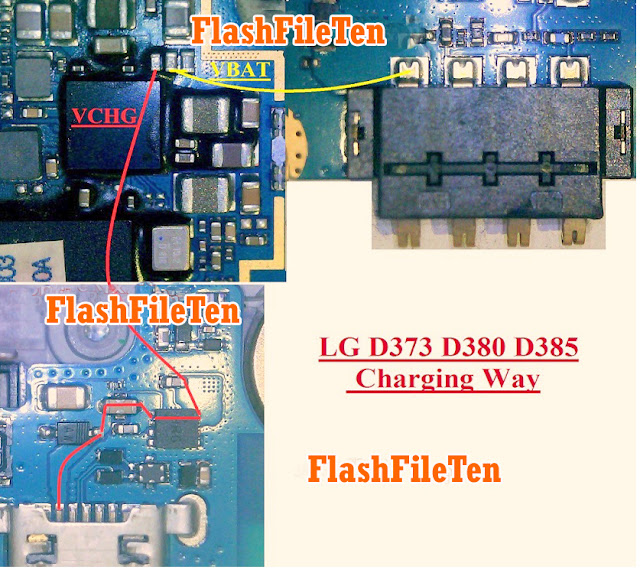
LG L80 D373 Charging Problem Jumper Solution Ways
LG L80 D373 Charging Problem Jumper Solution Ways
LG L80 D373 Charging Ways,LG L80 D373 Charging Jumper,LG L80 D373 Charging Solution,LG L80 D373 Charging ic Jumper,LG L80 D373 Charging Problem,LG L80 D373 Usb Charging ,LG L80 D373 Usb Charging Ways ,LG L80 D373 Charging Not working,LG L80 D373 Charging Jumper Solution,LG L80 D373 Not Charging ,LG L80 D373 Charging ic Jumper,LG L80 D373 Charging ,
Available link for download
Subscribe to:
Posts (Atom)