Showing posts with label solution. Show all posts
Showing posts with label solution. Show all posts
Tuesday, November 1, 2016
220 MICROPHONEPROBLEM SOLUTION WAYS
220 MICROPHONEPROBLEM SOLUTION WAYS
..
220 HDPHONE SOLUTION 100% WORKING 220 rspker problem solution just jumper
220 l dissplay line missing solution
220 full not charging solution how to work
220 usb line missing problem solution not work usb
220 sim ic line jumper solution not work sim bach
220 pawer line not working pawer SWITCH WAYS solution
220 microphone problem not working solution
220 hardphone log problem solution
220 ringer not working ic jumper solution
Available link for download

Samsung Galaxy i9060 Mic Jumper Solution
Samsung Galaxy i9060 Mic Jumper Solution
Samsung Galaxy i9060 Mic,i9060 mic ic,i9060 mic problem,i9060 mic ,i9060 mic ic jumper, i9060 mic jumper,i9060 mic not working,i9060 mic solution,i9060 mic problem solution,i9060 mic jumper solution,i9060 mic ways,

Available link for download
DUAL SIM PROBLEM WAYS Solution 220
DUAL SIM PROBLEM WAYS Solution 220
....
220 CHARGER NOT SUPPORTED SOLUTION 100% Working
Available link for download
Motorola v3i keypaid ic jumper Tested Solution
Motorola v3i keypaid ic jumper Tested Solution

Motorola v3i keypaid ic jumper Tested Solution
Available link for download
Sunday, October 30, 2016
Nokia C2 06 Mic Problem Solution Jumper Ways Microphone
Nokia C2 06 Mic Problem Solution Jumper Ways Microphone
Nokia C2-06 Mic not working, Microphone is not working in Nokia C2-06, Voice is missing and can not reach to destination Mobile Phone, Mic problem, Microphone Solution in Nokia C2-06
nokia 100 sim ways 100% tested solution

Tools:-
Nokia T5 and T4 for disassemble.
Universal Microphone.
Electronics Cleaner.
Hot Air.
Electronics Meter.
Solding iron.
Diagnostics & Solutions:-
Before Disassemble of Nokia C2-06 make sure that mic whole in Cassing ( housing ) is opened. And here is not any dust in it. Disassemble the mobile phone and remove mic microphone from mother board with solding iron.
Check points on mother board with miter and if any value is missing check all these parts that are given in red and blue color in above diagram.If any of them is missing apply jumpers as described in above repairing picture.
Replace new mic and apply jumpers to its negative and positive points. On the mother board Red color line shows ground print and Blue line indicates positive print of mic. So this will help you to solve mic problem in nokia C2-06
Warnings:-
Apply solder on mic and Remove mic when it too hot so that mic print remain OK.
Don’t apply much heat with hot air it can damage the mother board.
Assemble with focus because if mic is not in its proper place voice will not reach to destination mobile. Or you will not be able to record voice in it.
for more detail and new tips and tricks about cellphone service problem keep visiting this page we will update cellphone service diagrams timely with new cellphone diagrams.some related post are also given bellow you can read them also for more information about cellphone.
nokia 100 sim ways 100% tested solution
Tools:-
Nokia T5 and T4 for disassemble.
Universal Microphone.
Electronics Cleaner.
Hot Air.
Electronics Meter.
Solding iron.
Diagnostics & Solutions:-
Before Disassemble of Nokia C2-06 make sure that mic whole in Cassing ( housing ) is opened. And here is not any dust in it. Disassemble the mobile phone and remove mic microphone from mother board with solding iron.
Check points on mother board with miter and if any value is missing check all these parts that are given in red and blue color in above diagram.If any of them is missing apply jumpers as described in above repairing picture.
Replace new mic and apply jumpers to its negative and positive points. On the mother board Red color line shows ground print and Blue line indicates positive print of mic. So this will help you to solve mic problem in nokia C2-06
Warnings:-
Apply solder on mic and Remove mic when it too hot so that mic print remain OK.
Don’t apply much heat with hot air it can damage the mother board.
Assemble with focus because if mic is not in its proper place voice will not reach to destination mobile. Or you will not be able to record voice in it.
for more detail and new tips and tricks about cellphone service problem keep visiting this page we will update cellphone service diagrams timely with new cellphone diagrams.some related post are also given bellow you can read them also for more information about cellphone.
Available link for download
Nokia Asha 201 MIC Jumper Ways Problem Solution
Nokia Asha 201 MIC Jumper Ways Problem Solution
this is diagram to show you that how to jumper mic in Nokia Asha 201.as in diagram we can see there are four prints in mic.one of these points is ground.and the front prints of it are for next point.
Nokia C2-06 Mic Problem Solution Jumper Ways Microphone

between these two point add a 1k resistance.so with this diagram you can use only two point and mic will work well and ok.
for more detail and new tips and tricks about this problem keep visiting this page we will update it timely with new diagrams.some related post are also given bellow you can read them also for more information.
Nokia C2-06 Mic Problem Solution Jumper Ways Microphone
between these two point add a 1k resistance.so with this diagram you can use only two point and mic will work well and ok.
for more detail and new tips and tricks about this problem keep visiting this page we will update it timely with new diagrams.some related post are also given bellow you can read them also for more information.
Available link for download
Saturday, October 29, 2016
nokia 100 not charging problem solution
nokia 100 not charging problem solution
If you are facing not charging problem in nokia 100 then this diagram will help you to solve nokia 100 not charging problem.
Nokia 105 not charging solution solution here

If you plug in charging pin into nokia 100 and it show notification of not charging or charger not supported then change the component that is shown in above diagram.
This IC is used to for nokia 100 not charging solution.
Nokia 105 not charging solution solution here
If you plug in charging pin into nokia 100 and it show notification of not charging or charger not supported then change the component that is shown in above diagram.
This IC is used to for nokia 100 not charging solution.
Available link for download
Friday, October 28, 2016
Nokia C2 00 Lcd Ways Lcd Light Solution
Nokia C2 00 Lcd Ways Lcd Light Solution
Lcd Ways

Light Ways

Available link for download
nokia 100 sim ways 100 tested solution
nokia 100 sim ways 100 tested solution
to solve nokia 100 insert sim problem you can read this diagram and follow these jumpers that are given in it. In the bellow diagram some different color lines are given these lines are the paths of sim points.
Nokia X2-00 lcd light problem solution here

check these tracks with meter and if any of them is missing apply these jumpers to solve insert sim problem in nokia 100.
near the resistance you can find out some small points that can be scratch and apply jumpers on these points if resistance is missing.
Nokia X2-00 lcd light problem solution here
check these tracks with meter and if any of them is missing apply these jumpers to solve insert sim problem in nokia 100.
near the resistance you can find out some small points that can be scratch and apply jumpers on these points if resistance is missing.
Available link for download
Thursday, October 27, 2016

Driver Pack Solution V13 Full Free Download For Windows
Driver Pack Solution V13 Full Free Download For Windows
Driver Pack solution helps you to find missing driver packages. You can use it as a administer on your PC because it will automatically install missing drivers which is needed to run your PC. If you have an internet connection you can download and missing drivers easily by the help of driver pack solution. DriverPack Solution 15.11 when once introduced into your framework will check it altogether to miss and additionally obsolete drivers. Once the checking procedure is finished then it will demonstrate a rundown of the considerable number of drivers which are should have been be introduced or overhauled. It has thought of a tremendous assortment of drivers and you can discover a wide range of drivers which can be introduced into your framework consequently and spares a lot of your valuable time.

It is suitable for a wide range of PCs such as ASUS, Acer, Sony. HP, Lenovo and Samsung and so forth and it underpins all variants of Windows. Now you can download driver pack solution from below download links. The downloading links we have shared from free servers.
Download links
Driver Pack Solution (Official Server)
It is suitable for a wide range of PCs such as ASUS, Acer, Sony. HP, Lenovo and Samsung and so forth and it underpins all variants of Windows. Now you can download driver pack solution from below download links. The downloading links we have shared from free servers.
Download links
Driver Pack Solution (Official Server)
Available link for download
Nokia Lumia 710 Mic Problem Jumper Solution Tested
Nokia Lumia 710 Mic Problem Jumper Solution Tested
Nokia 710 Mic,Nokia Lumia 710 Mic Problem,Nokia 710 Mic Solution,Nokia 710 Mic Ways,Nokia 710 Mic ic,Nokia 710 Mic ic jumper ways,Nokia 710 Mic Jumper,Nokia 710 Mic Microphone Jumper,Nokia 710 Mic Jumper Solution,Nokia 710 Mic Mic Not Working,Nokia 710 Mic Jumper Ways,
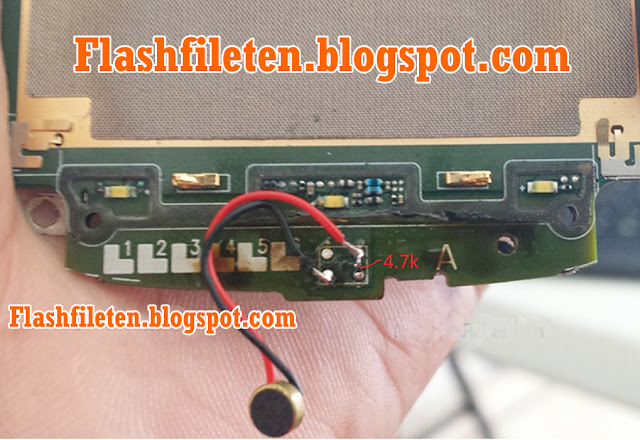 |
| Nokia Lumia 710 Mic Problem Jumper Solution |
Available link for download
Nokia C3 01 Touch Sensor Problem Solution
Nokia C3 01 Touch Sensor Problem Solution

Nokia C3-01 Touch Sensor Problem Solution
Available link for download

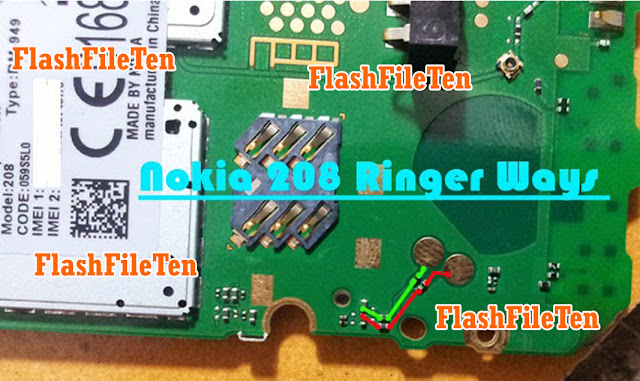
Nokia 208 Ringer Not working Jumper Solution
Nokia 208 Ringer Not working Jumper Solution
nokia 208 ringer ways,nokia 208 ringer problem,nokia 208 ringer solution,nokia 208 ringer ic,nokia 208 ringer ic jumper solution,nokia 208 ringer jumper,nokia 208 ringer,nokia 208 ringer and speaker solution,nokia 208 ringer ic jumper,nokia 208 ringer jumper ways,nokia 208 ringer not working,nokia 208 no ringer,nokia 208 ringer track,
Available link for download
Tuesday, October 25, 2016
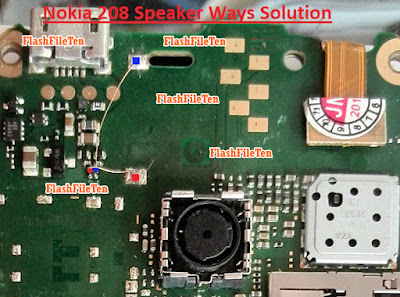
Nokia 208 Speaker Not working jumper Solution
Nokia 208 Speaker Not working jumper Solution
Nokia 208 Speaker problem jumper Ways
nokia 208 speaker way,nokia 208 speaker problem,nokia 208 speaker jumper,nokia 208 speaker solution,nokia 208 ear speaker solution,nokia 208 ear speaker jumper,nokia 208 speaker not working,nokia 208 speaker problem solution,nokia 208 ear speaker not working,
Available link for download
Nokia 7100s Bluetooth Problem Solution
Nokia 7100s Bluetooth Problem Solution

Available link for download

Nokia Asha 201 Charging Problem Solution Jumpers Ways
Nokia Asha 201 Charging Problem Solution Jumpers Ways
In nokia asha 201 if it is not charging ok and you have not charging problem in nokia asha 201 then you can solve this problem with help of diagram bellow. in this diagram all charging links are identified so that you can understand which parts are used in charging function in nokia asha 201.
Nokia Asha 201 MIC Jumper Ways Problem Solution

So one print is ground it is identified in diagram with blue color and red cooler is a positive print and you can check all track with meter and if any of them is broken you can apply jumper as defined in repairing diagram.mostly if we plug in charger and it does not show any thing it can be fault of charging base or may be fault of broken link. so check charging base also.
If it shows not charging indication or a message charger not supported then it can be fault of charging ic or may be due to 47k resistance. About these problems I will post in upcoming days.
for more detail and new tips and tricks about cellphone service problem keep visiting this page we will update cellphone service diagrams timely with new cellphone diagrams.some related post are also given bellow you can read them also for more information about cellphone.
Nokia Asha 201 MIC Jumper Ways Problem Solution
So one print is ground it is identified in diagram with blue color and red cooler is a positive print and you can check all track with meter and if any of them is broken you can apply jumper as defined in repairing diagram.mostly if we plug in charger and it does not show any thing it can be fault of charging base or may be fault of broken link. so check charging base also.
If it shows not charging indication or a message charger not supported then it can be fault of charging ic or may be due to 47k resistance. About these problems I will post in upcoming days.
for more detail and new tips and tricks about cellphone service problem keep visiting this page we will update cellphone service diagrams timely with new cellphone diagrams.some related post are also given bellow you can read them also for more information about cellphone.
Available link for download
Monday, October 24, 2016
Nokia C3 00 Fake Charging Not Charging Solution
Nokia C3 00 Fake Charging Not Charging Solution

Nokia C3-00 Fake Charging
Available link for download
Subscribe to:
Posts (Atom)