Showing posts with label s5360. Show all posts
Showing posts with label s5360. Show all posts
Tuesday, October 4, 2016
How to Increase the Internal Memory of Samsung Galaxy Y S5360
How to Increase the Internal Memory of Samsung Galaxy Y S5360
Here in this post we will guide you how to increase the internal memory of Samsung Galaxy Y S5360. Here’s the complete details:
The age that witnessed the use of external memory has certainly been transformed to a time that has integrated memory internally in phones. Most new phones that hit the markets these days do not come with external memory slots. Rather, smart phone companies are releasing high end models that have mammoth internal memory space.
It is quite expected to consider the fact that technology has been advancing at astronomical rates. Even if, phones do provide for expansion of memory, they come with large internal memory capacities. The approach was based on a provision for user friendly features in current day smart phones.
Let us now look at how to increase the internal memory capacity in the Samsung Galaxy Y S5360. It is amongst the most popular models and the phone was first among entry level smart phones that were developed on the android platform. As being one of the first android phones to hit the markets, the phone wasn’t intended to be integrated with a large memory capacity.
Instead, the phone’s makers concentrated on enhancing productivity by making it compatible with the popular android platform. AS such, the phone’s internal memory is only 160 MB. Now here is the exciting part. You can actually increase the phone’s internal memory thereby making enough and more room for the apps and games you wish to download and play.
Here’s the catch. Using the external memory by fitting a memory card on the slot is a different thing. Here, by following a few steps, it is possible to increase the internal memory of your phone actually. Here are the steps you are required to follow:
Step 1 
Rooting the phone
You need to root your Samsung galaxy Y using a root file. The technique of rooting is quite easy, steps for which are widely available to the internet.
Step 2
Creation of a partition
The second step involves the creation of a partition. You must partition your memory card or micro SD card, whatever the phone uses. The Galaxy S comes with a micro SD slot, so that is what has to be partitioned.
Step 3
Execution of Partitioning
The third step involves executing the necessary partitioning. Partitioning of the card on the phone is different from what is done in a desktop computer or a laptop for that matter. In order to achieve partitioning, you have to install software known as MiniTool. There are many software that are available in the market that perform partitioning. But for now, let’s just stick with MiniTool.
Once the download of the partition wizard is accomplished, go ahead and run the application after installing the same.
Step 4
This step involves the achievement of partitioning without the loss of information. Partitioning could be sometimes resulting in loss of valuable data. It is advisable to store a backup of crucial information. If yours is a new version of the micro SD, you are good to go without creating a backup. It is necessary to read everything you agree to while following the steps. Proceeding with a little forethought is recommended.
Step 5
Next, plug your phone to the system, Select the fat32 file system option ad click on apply. Once that is done, you can edit the micro SD and click on re-size. You can re-size to whatever capacity you wish (depending on the capacity of your card that is).
Step 6
You’ll get the MiniTool window. Choose the EXT3 file system and click on apply.
Step 7
Next, you’ll need to install the link2sd application. Run the application, follow the instructions, reboot your device and you are all good to go.
Finished!
Available link for download

Friday, September 30, 2016
Samsung GT S5360 Stock Rom firmware
Samsung GT S5360 Stock Rom firmware
Hello guys welcome to my blog (trickstrickzz.blogspot.com).
HERE
You can Download any Mobile Original(OG) Firmware/Stock Rom.
&
Its free
So Download your mobile Firmware From Here...
Samsung GT-S5360
Samsung s5360 is gsm &HSPA technology .samsung announced this device on 2011.available in market 2011.7 body weight -97.5grm only.CPU-800mhz(arm-6)&.Card Slot-MicroSD-32gb(upto)&Internal-180mb.RAM-290mb.Primary Camera-3.15mp&secondary-2mp.OS-Google Android(2.3.6 gingerbred) Battery-1200mah( removable).multi touch-yes,Display TFT display,touch wiz ui touch sensitive ui.Wifi- available.GPS-available....It is very good very value for money product..
Samsung stock rom download files flash by odin only ..so 1st download odin flasher for samsung...then flash it via odin.
Download link attached below

DOWNLOAD
&
See How to Flash your Phone
1.Download and install Samsung USB Driver on your computer.
2. Download & extract zip file in your computer...
3. Power off your Samsung device.
4. Go to Download mode using vol-&home key&power key.on your Samsung Devices.
5.In the Download mode you will be see Download mode.
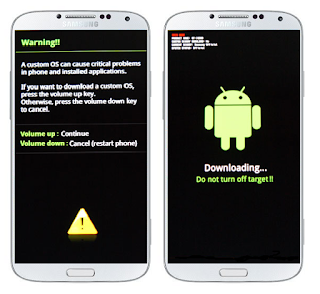
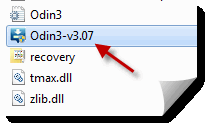
7:-Now open Odin 3 &connect your phone to the computer.
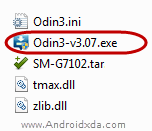
See full Details how about to flash click here
Available link for download
Subscribe to:
Posts (Atom)