

Showing posts with label gt. Show all posts

Sunday, October 30, 2016

Samsung GT S5830 Stock Rom firmware

Samsung GT S5830 Stock Rom firmware


Hello guys welcome to my blog (trickstrickzz.blogspot.com).
HERE
You can Download any Mobile Original(OG) Firmware/Stock Rom.
&
Its free
 So Download your mobile Firmware From Here...

 Samsung GT-S5830


Samsung s5830 is gsm &HSPA technology .samsung announced this device on  2011.available in market  2012.7 body weight -97.5grm only.CPU-832mhz(arm-11)GPU-adreno200&.single sim device.Card Slot-MicroSD-32gb(upto)&Internal-180mb.RAM-280mb.Primary Camera-5mp&secondary-no.OS-Google Android(2.3.5 Gingerbred) Battery-1200mah( removable).multi touch-yes,Display TFT display,3.5 inch display-touch wiz ui v3.0 touch sensitive ui D Proctection-gorila glass.Wifi- available.GPS-available....It is very good very value for money product..


Samsung  stock rom download files flash by odin only ..so 1st download odin flasher for samsung...then flash it via odin.
  I am not responsible any Damage on Your device.so backup your phone first.then flash your Samsung device via odin..


 Download link attached below

DOWNLOAD


See How to Flash your Phone

1.Download and install Samsung USB Driver on your computer. 


2. Download & extract zip file in your computer..


3. Power off your Samsung device.


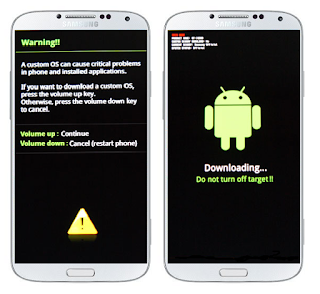
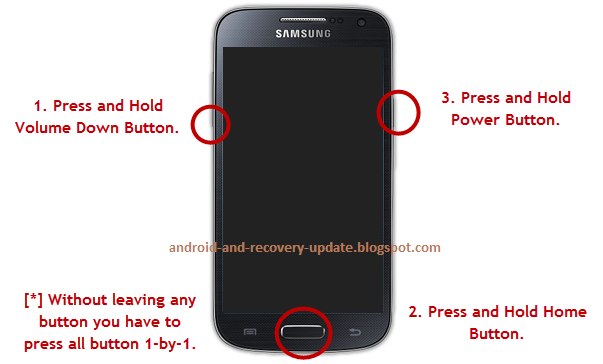
4. Go to Download mode using vol-&home key&power key.on your Samsung Devices.


5.In the Download mode you will be see Download mode.

 
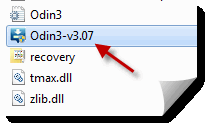
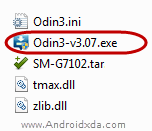
6:-Download & extract Odin on your computer.After Downloading you will be able to see this following files.

7:-Now open Odin 3 &connect your phone to the computer.
8:-Once you have connected phone to the computer,Odin Will automatically recognize device and show added message at the left panel.


See full Details how about to flash click here 


Available link for download

Read more »

Saturday, October 29, 2016

Galaxy Star Pro Dous GT S7262 Flash CWM Recovery Root

Galaxy Star Pro Dous GT S7262 Flash CWM Recovery Root


 SAMSUNG S7262  How To Root And CWM Flash

Samsung Galaxy Star Pro Duos is a low range dual SIM smartphone from Samsung, some devices are rooted directly and only rooting dont fully customize an Android device, thats why we are now Flashing/Installing a custom Recovery so that we can root Samsung Galaxy Star Pro Duos and also Flash Custom ROMs. 

Before You Begin: (must do)
1. Drivers should be properly installed on your PC, if not so go to: Samsung USB Drivers.
Samsung Andorid USB Driver for Windows | SAMSUNG Developers

Downloads:
1. Recovery.tar
Zippyshare.com - recovery.tar
2. Odin
https://docs.google.com/uc?export=download&id=0BxzKWBQ99T28SlR1bUcweVhVS3c

Flashing Recovery:
1. Download the above both files.
2. Extract the Odin zip file.
3. Open the Odin
4. Turn off your device.
5. Turn it on in download mode by pressing Volume Down + Power Button + Home Button at the same time, dont leave buttons until a Warning screen appears, leave the buttons when Warning screen appears, and then press Volume Up button to continue to Download Mode.
6. Connect Your device to PC via USB Cable.
7. Added! message will be shown in message box of Odin.
8. Now in Odin click on PDA and choose the Recovery.tar zip file.
9. Then click Start. Your device will be flashed with a custom recovery.
To go into Recovery Mode, Press and hold Volume Up + Home Button + Power Button at the same time, you will see phone starts in Recovery Mode.


Available link for download

Read more »

Thursday, October 27, 2016

Samsung Galaxy S4 Active Mini GT I8580 How to Install I8580XXUANB1 Android 4 2 2 Jelly Bean Firmware

Samsung Galaxy S4 Active Mini GT I8580 How to Install I8580XXUANB1 Android 4 2 2 Jelly Bean Firmware


Samsung Galaxy S4 Active Mini GT-I8580- How to Install I8580XXUANB1 Android 4.2.2 Jelly Bean Firmware,I8580XXUANB1 Android 4.2.2 Jelly Bean Firmware Last Updated on 24-Feb-2014. Samsung Galaxy S4 Active Mini GT-I8580 users can now update their device with the latest XXUANB1 Android 4.2.2 Jelly Bean official firmware. Samsung started rolling out an OTA update about the firmware. The latest firmware build version is I8580XXUANB1. However, the firmware is currently out for Russia. Hope the firmware will hit other part of the world soon. The device recently released with Android 4.2.2 Jelly Bean and already get firmware update. Here we have the latest available official firmware update for the device. If you own the device and not yet updated this latest firmware, then update the same using our simple tutorial below. The below guide will help you to download and install the I8580XXUANB1 Android 4.2.2 Jelly Bean Firmware manually through Odin. You can also check latest available firmware for your device through OTA (over the air) from Settings-About Phone-Software Update.
Samsung Galaxy S4 Active Mini GT-I8580- How to Install I8580XXUANB1 Android 4.2.2 Jelly Bean Firmware
As the Galaxy S4 Active Mini I8580 already running on Android 4.2.2 Jelly Bean, you can only expect few bug fixes and performance enhancement with this latest firmware update. So, want to update your Galaxy S4 Active Mini I8580 to the latest XXUANB1 Android 4.2.2 Jelly Bean firmware? To install in official way, either you can go for OTA update as mentioned above or download firmware through the Samsung Kies utility. However, most of us prefer manual way to update official firmware. So, in this article you’ll find step by step manual guide to update the latest Android 4.2.2 XXUANB1 firmware on your Galaxy S4 Active Mini I8580 through Odin.

Important Note:

“The firmware is released only for the Samsung Galaxy S4 Active Mini GT-I8580 model, so don’t try this in any other android device. Check your device model number from Settings-About Phone. Also the tutorial is based on Windows PC. Follow all the pre-requisites, procedures and steps carefully to avoid breaking your phone”.

Android 4.2.2 Jelly Bean I8580XXUANB1 Official Firmware Download List

Samsung rolled out the firmware for the following countries. The firmware which are unbranded or not locked to any carrier, no matter of which country or region, can be flashed on any Galaxy S4 Active Mini GT-I8580 model.
Russia: SER-I8580XXUANB1-20140224093755.zip
[Firmware for rest of the countries and carrier will be added here when available]

Previous Firmware Build:

Samsung Galaxy Note 3 SM-N900- How to Install N900XXUDNA6 Android 4.4.2 KitKat Firmware.
Samsung Galaxy S4 GT-I9500 How TO Root I9500XXUEMK8 Android 4.3 Jelly Bean Firmware
How To Root R950VXUBMK3 Android 4.3 Jelly Bean Firmware Running on US Cell Samsung Galaxy Note 2
How To Root L710VPUCMK3 Android 4.3 Jelly Bean Firmware Running on

Pre-Requisites:

  • Check battery percentage, your device should have at least 60% battery power
  • Turn on USB Debugging mode, go to Settings-Developer Options-USB Debugging
  • Backup important data and settings to external storage- follow this guide
  • Install USB driver for your device on your computer- Download Samsung USB Driver

Points to be noted:

  • If you are using any Custom ROM such as- CyanogenMod, Paranoid Android, AOKP, SLIM ROMs etc, then it’ll replaced by this official Stock ROM
  • Custom Recovery (CWM or TWRP Recovery) will be replaced by Stock Recovery
  • After flashing official firmware, your device will no longer belongs to rooted device. However you can root your device any time after flashing the firmware.
All the above pre-requisites are very important and must follow before proceed to installation guide. Hope you get all the above points. Now, go through the below tutorial to install Android 4.2.2 I8580XXUANB1 official firmware on Galaxy S4 Active Mini I8580.

How to Install Android 4.2.2 Jelly Bean Official Firmware on Galaxy S4 Active Mini I8580 through Odin:

Samsung Galaxy S4 Active Mini GT-I8580- How to Install I8580XXUANB1 Android 4.2.2 Jelly Bean Firmware
  1. Download Android 4.2.2 XXUANB1 Firmware for Galaxy S4 Active Mini I8580 from the above list
  2. Download Odin 3.09
  3. Switch off your phone and boot Galaxy S4 Active Mini I8580 into Download Mode by pressing and holding the Volume Down+Home+Power buttons (long press until the boot screen appear), now press Volume Up key to proceed to Download Mode.
  4. Extract the downloaded Odin3.09 zip file and run the Odin3 v3.09.exe file as an administrator (Right click on the .exe file and click on Run as administrator)
  5. Now connect your Galaxy S4 Active Mini I8580 to your computer via USB cable
  6. In Odin3 screen, you should see a COM Port number like “0:[COM7]” at ID:COM section and “Added!” text at the message box. This means your device has been detected by Odin3.
  7. Make sure that, only the “Auto Reboot” and “F. Reset Time” options are checked.
  8. Now, extract the downloaded firmware zip file, you’ll find a firmware file with extension .tar.md5
  9. In Odin screen, click on AP button and select the firmware file with .tar.md5 extension (The firmware file look something like: I8580XXDLJ5_I8580ODDDLI7_INU.tar.md5)
  10. Now, click on the Start button to begin the installation process, wait few moments.
  11. Once completed, you would see “PASS!” message in ID:COM port having green background
  12. Your phone should automatically reboot after completion
  13. You can now disconnect your phone from computer
  14. Finish
That’s all the above steps to update Android 4.2.2 Jelly Bean official firmware on Galaxy S4 Active Mini GT-I8580. Hope you successfully done the update process. If you followed everything as mentioned above, then your your Galaxy S4 Active Mini should now running on the latest Android 4.2.2 Jelly Bean build version XXUANB1. You can confirm the firmware update details from Settings-About Phone. You can contact with us using the comment form below, if you find any problem with the above tutorial and download link and also share your experience with us.

Available link for download

Read more »

Monday, October 24, 2016

Samsung GT S7582 cert File Download 100 okay With Out Password

Samsung GT S7582 cert File Download 100 okay With Out Password


Download Here


Available link for download

Read more »

Saturday, October 22, 2016

Galaxy S3 Neo GT I9300I Dd Boot Repair

Galaxy S3 Neo GT I9300I Dd Boot Repair


REQUIRMENTS

1) 16 GB SD card
2) Win32r
3) unbrick file
4) odin and stock firmware


Download Win32r

Download unbrick file

Download Odin

Download Stock Firmware

For 4 file repair firmware Srch tis file I9300IXXUAND1_I9300IOJVAND1 in z3x support or HWK support

Procedure

1) install the Win32r
2) download and extract the debrick.zip u will find a debrick.img
3) insert sd card (16 GB class 4 or 10) and format it
4) open Win32r
5) open img file and write to sd card
6) after complete remove sd card from pc and insert it into your neo
7) insert back the battery and press vol down + home + power button
8) u will get into download mode
9) now remove your sd card from mobile
10) open odin and add your firmware and flash


Note:Test nd post result

Available link for download

Read more »

Wednesday, October 19, 2016

Samsung Galaxy S3 GT I9300 Simple Tutorial Root I9300UBUGML2 Android 4 3 Firmware

Samsung Galaxy S3 GT I9300 Simple Tutorial Root I9300UBUGML2 Android 4 3 Firmware


Samsung Galaxy S3 GT-I9300- Simple Tutorial Root I9300UBUGML2 Android 4.3 Firmware,A simple method to root I9300UBUGML2 Android 4.3 Jelly Bean Firmware is now available at NasirTech. Samsung Galaxy S3 GT-I9300 recently get updated to the I9300UBUGML2 4.3 Jelly Bean Firmware. If you yet to update the firmware, then update the same by following the above link. Hope you updated this latest firmware on your device and now you can root the UBUGML2 firmware using our simple tutorial below. The below guide will help you to root I9300UBUGML2 4.3 Jelly Bean Firmware running on Galaxy S3 GT-I9300. Continue reading the tutorial for complete guide.
After updating official firmware, your device no longer belongs to rooted device. So, after official firmware update, many of us prefer to root our device to enjoy some additional features that unrooted android device doesn’t offer. With a rooted android device, you can install apps that ask root permission, flash various custom ROMs, install MODs and tweak various features. Root removes default bloatware apps that free-up lots of memory space and extend the battery life. However, once rooted, manufacturer warranty will be void. But you can regain the warranty by following proper unroot process. To know more about benefits of rooting android device, read- Complete Note on What is Rooting and Benefits of Rooting Android Phone.
Samsung Galaxy S3 GT-I9300- Simple Tutorial Root I9300UBUGML2 Android 4.3 Firmware
So, want to root Galaxy S3 GT-I9300 Running I9300UBUGML2 4.3 Jelly Bean Firmware? Continue reading this page to get all the necessary steps to successfully root your device. The root file (CF-Auto-Root) we used in this tutorial is safe and have nearly 100% success rate. We’ll use Odin software to flash the root file.
The tutorial is made with simple step by step guide, so that even an android newbie user can follow and successfully root his/her device. However, in this process you may loss your personal data and settings. So, we recommend you to follow all the backup instructions before proceed to rooting guide.

Warning!

  • This rooting tutorial is only applicable for Samsung Galaxy S3 GT-I9300 model (m0). So, don’t try this in any other android device. Check your device model number from- Settings-About Phone.
  • Rooting voids your phone’s manufacturer warranty. However, you can get back the warranty anytime by following proper unroot process or by flashing official firmware.
  • This guide is for educational purpose and you should try this at your own risk. We are not responsible if your device experience a soft brick after following this tutorial.

Pre-Requisites:

  • Check battery percentage, charge your device to a decent level of at least 60% battery power. Your device should not turn off during installation.
  • Turn on USB Debugging mode, go to Settings-Developer Options-USB Debugging
  • Backup important data and settings to external storage- follow this guide
  • Install USB driver for your device on your computer- Download Samsung USB Driver
All the above pre-requisites are very important and must be followed before proceed to installation guide. Hope you get all the above points and done as mentioned. Now, you are ready to move to the final step of this tutorial where we have arranged a step by step details guide to root Galaxy S3 GT-I9300 running  I9300UBUGML2 4.3 Jelly Bean firmware.

Steps to Root Galaxy S3 GT-I9300 Running I9300UBUGML2 4.3 Jelly Bean through Odin:

Samsung Galaxy S3 GT-I9300- Simple Tutorial Root I9300UBUGML2 Android 4.3 Firmware
  1. Download CF-Auto-Root for Galaxy S3 I9300 and extract the Zip file: CF-Auto-Root-m0-m0xx-gti9300.zip
  2. Download Odin 3.09 and extract the Zip file: Odin3_V3.09.Zip
  3. Now, Switch off your phone and boot Galaxy S3 I9300 into Download Mode by pressing and holding the Volume Down+Home+Power buttons together (long press until the boot screen appear), now press Volume Up key to proceed to Download Mode.
  4. Run the Odin3 v3.09.exe file as an administrator (Right click on the .exe file and click on Run as administrator)
  5. Now connect your Galaxy S3 I9300 to your computer via USB cable
  6. In Odin3 screen, you should see a COM Port number like “0:[COM7]” at ID:COM section and “Added!” text at the message box. This means your device has been detected by Odin3.
  7. Make sure that, only the “Auto Reboot” and “F. Reset Time” options are checked.
  8. Now, click on the AP button and select the CF-Auto-Root-m0-m0xx-gti9300.tar.md5 file.
  9. Finally, click on the Start button to begin the rooting process, wait few moments.
  10. Once completed, you would see “PASS!” message in ID:COM port having green background
  11. Your phone should automatically reboot after completion
  12. You can now disconnect your phone from computer
  13. Finish
Congrats! You have completed the tutorial to root Galaxy S3 I9300 running I9300UBUGML2 4.3 Jelly Bean Firmware. Hope you successfully done the rooting process. If you followed everything as mentioned in the above tutorial, then your Galaxy S3 I9300 should now rooted and you have complete control over your device. Now, install apps that ask root permission or flash various custom ROMs. To verify your device is rooted or not, you can download and run the Root Checker App from Google Play Store. If you have any doubt or query about the tutorial, feel free to contact with us using the comment form below, and share your rooting experience with us.

Available link for download

Read more »

No Warranty Void Root Android 4 3 for Samsung Galaxy S3 GT I9300

No Warranty Void Root Android 4 3 for Samsung Galaxy S3 GT I9300


Samsung has blocked rooting the international version of the galaxy S3 GT-I9300 by using SafeRoot method, which was completely safe, easy and it doesnt void the warranty of the phone nor trip flash (binary) counter.
I have found a way to make "SafeRoot" root the galaxy S3 GT-I9300 on the latest android 4.3 jelly bean like any other devices.

Requirements :
  • I9300_Root_Kernel file
  • I9300_MK6_Kernel file
  • Odin3
  • Installed Samsung Kies or Samsung mobile USB driver
  • Saferoot file
Instructions :
  1. All the process WONT wipe your data, but back it up just incase this process corrupt your data.
  2. Flash Root_Kernel.tar.md5 file by odin3 in PDA or AP section.
  3. Make sure Re-Partition is NOT selected.
  4. Root your device using SafeRoot method by following this guide : [No Warranty Void] Safe Root Android 4.3 for Galaxy S3/S4 Note 2
  5. Flash back the current kernel of your firmware MK6 until Samsung update it by Odin3
Congratulation, your galaxy S3 GT-I9300 is rooted on the latest version of Android 4.3 jelly bean without tripping flash (binary) counter.
YT video link : http://www.youtube.com/watch?v=3gYjoW22h7c
Notes:
  • Download and install manually busybox if the tool is failed to install it.
  • Use this guide at your own risk
  • This process and kernel files ONLY for the international version GT-I9300 and ONLY for Android 4.3 jelly bean.
  • Normally this process will continue to work until Samsung starts to push Android 4.4 kitkat to the S3 (DONT use it on 4.4 kitkat, it will brick your device).
  • You will not be able to receive OTA update, but you can update your device at any time by Kies or Odin3. 
  • This process is tested by me and worked on all the latest Android 4.3 jelly bean firmwares.
  • To unroot your device --> Open SuperSU app / Settings / Full UnRoot.
Downloads :
  • Odin3 v3.04 HERE, v3.07 HERE, v3.09 HERE
  • Latest Samsung Mobile Driver HERE
  • Latest Samsung Kies HERE
  • Latest Samsung Kies 3 HERE
  • I9300_Root_Kernel HERE
  • I9300_MK6_Kernel  HERE 
  • I9300_NB1_Kernel HERE thanks to "afham"
  • SafeRoot files HERE 

Available link for download

Read more »

Tuesday, October 18, 2016

Samsung GT P7300 Stock Rom firmware

Samsung GT P7300 Stock Rom firmware


Hello guys welcome to my blog (trickstrickzz.blogspot.com).
HERE
You can Download any Mobile Original(OG) Firmware/Stock Rom.
&
Its free
 So Download your mobile Firmware From Here...


  Samsung GT-P7300


Samsung  stock rom download files flash by odin only ..so 1st download odin flasher for samsung...then flash it via odin.


 Download link attached below

DOWNLOAD 

See how to flash
 
1.Download and install Samsung USB Driver on your computer.
2. Download & extract zip file in your computer...
3. Power off your Samsung device.
4. Go to Download mode using vol-&home key&power key.on your Samsung Devices.

See full Details how about to flash click here


Available link for download

Read more »

Thursday, October 13, 2016

Samsung GT P7500 Stock Rom firmware

Samsung GT P7500 Stock Rom firmware


Hello guys welcome to my blog (trickstrickzz.blogspot.com).
HERE
You can Download any Mobile Original(OG) Firmware/Stock Rom.
&
Its free
 So Download your mobile Firmware From Here...

 Samsung GT-P7500


Samsung p7500 is gsm &HSPA technology .samsung announced this device on  2011.available in market 2011.available Status discontinued.7 body weight -565g only.CPU-1.ghz(dual core)&Chipset-nvidia tegra 2.GPU-ULP Geforce.Card Slot-MicroSD-3no)&Internal-16/32/64.RAM-1GB.Primary Camera-3.15mp&secondary-2mp.OS-Google Android(3.2 honey comb) Battery-7100mah(non removable).Multi touch-yes.D.Proctection-gorila glass.10.1inch display.its very good product and value for money product..


Samsung  stock rom download files flash by odin only ..so 1st download odin flasher for samsung...then flash it via odin.


 Download link attached below

DOWNLOAD 

                                      &
                  See How to Flash your Phone

1.Download and install Samsung USB Driver on your computer.

2. Download & extract zip file in your computer...

3. Power off your Samsung device.

4. Go to Download mode using vol-&home key&power key.on your Samsung Devices.

 5:- In the Download mode you will be see Download mode.

 Step-6:-Download & extract Odin on your computer.After Downloading you will be able to see this following files.

Step-7:-Now open Odin 3 &connect your phone to the computer.
 
 
Step-8:-Once you have connected phone to the computer,Odin Will automatically recognize device and show added message at the left panel.


Step-9:-Once your device is detected by Odin, click on the PDA button & Select the tar.md5 that you have extracted in Step#2.
 

See full Details how about to flash click here


Available link for download

Read more »

Tuesday, October 11, 2016

Samsung Galaxy Win GT I8552 How to Install I8552XXANB1 Android 4 1 2 Jelly Bean Firmware

Samsung Galaxy Win GT I8552 How to Install I8552XXANB1 Android 4 1 2 Jelly Bean Firmware


Samsung Galaxy Win GT-I8552- How to Install I8552XXANB1 Android 4.1.2 Jelly Bean Firmware,
I8552XXANB1 Android 4.1.2 Jelly Bean Firmware Last Updated on 24-Feb-2014. Samsung Galaxy Win GT-I8552 users can now update their device with the latest XXANB1 4.1.2 Jelly Bean Official Firmware. Samsung recently started rolling out an OTA update about the firmware. The latest firmware build version is I8552XXANB1. The Galaxy Win is a  mid range Android Smartphone by Samsung, released in the month of April 2013 with Android 4.1.2 Jelly Bean and soon after release the device started receiving regular firmware update. We have already covered many firmware update here at NasirTech and here we have the latest firmware for the device. If you own the device and not yet updated this latest firmware, then update your device using our simple tutorial below. The below guide will help you to download and install the I8552XXANB1 Android 4.1.2 Jelly Bean Firmware manually through Odin.
Samsung-Galaxy-Win-GT-I8552 Firmware Update Guide As the Galaxy Win released with the Android 4.1.2 Jelly Bean, you can only expect few bug fixes and performance enhancement with this update. So, want to update your Galaxy Win I8552 to the latest XXANB1 Android 4.1.2 Jelly Bean firmware? To install in official way, either you can go for  OTA (over the air) from Settings-About Phone-Software Update or download firmware through the Samsung Kies utility. However, most of us prefer manual way to update official firmware. So, in this article you’ll find step by step manual guide to update the latest Android 4.1.2 XXANB1 firmware on your Galaxy Win I8552 through Odin.

Important Note:

“The firmware is released only for the Samsung Galaxy Win GT-I8552 model, so don’t try this in any other android device. Check your device model number from Settings-About Phone. Also the tutorial is based on Windows PC. Follow all the pre-requisites, procedures and steps carefully to avoid breaking your phone”.

Android 4.1.2 Jelly Bean I8552XXANB1 Official Firmware Download List

Samsung rolled out the firmware for the following countries. The firmware which are unbranded or not locked to any carrier, no matter of which country or region, can be flashed on any Galaxy Win GT-I8552 model.
Indonesia: I8552XXANB1_I8552OLBANB1_XSE.zip  |  Link2
Thailand: I8552XXANB1_I8552OLBANB1_THL.zip
Philippines (Sun): XTC-I8552XXANB1-20140224095131.zip |  Link2
[Firmware for rest of the countries and carrier will be added here when available]

Previous Firmware Build

Samsung Galaxy S4 Zoom How to Install C101XWUANA1 Android 4.2.2 Jelly Bean Firmware,
Samsung Galaxy Hennessy SCH-W789 Flip Phone- How to Insta W789KEUANA1 Android 4.1.2 Jelly Bean Firmware.
Samsung Galaxy Mini GT-S5570I- How to Install S5570IAIMJ1 Android 2.3.6 Gingerbread Firmware
Samsung Galaxy S3 GT-I9300T- How to Install I9300TDUUGNA4 Android 4.3 Jelly Bean Firmware.

Pre-Requisites:

  • Check battery percentage, your device should have at least 60% battery power
  • Turn on USB Debugging mode, go to Settings-Developer Options-USB Debugging
  • Backup important data and settings to external storage- follow this guide
  • Install USB driver for your device on your computer- Download Samsung USB Driver

Points to be noted:

  • If you are using any Custom ROM such as- CyanogenMod, Paranoid Android, AOKP, SLIM ROMs etc, then it’ll replaced by this official Stock ROM
  • Custom Recovery (CWM or TWRP Recovery) will be replaced by Stock Recovery
  • After flashing official firmware, your device will no longer belongs to rooted device. However you can root your device any time after flashing the firmware.
All the above pre-requisites are very important and must follow before proceed to installation guide. Hope you get all the above points. Now, go through the below tutorial to install Android 4.1.2 I8552XXANB1 official firmware on Galaxy Win I8552.

How to Install Android 4.1.2 Jelly Bean Official Firmware on Galaxy Win I8552 through Odin:

Samsung Galaxy Win GT-I8552- How to Install I8552XXANB1 Android 4.1.2 Jelly Bean Firmware
  1. Download Android 4.1.2 XXANB1 Firmware for Galaxy Win I8552 from the above list
  2. Download Odin 3.09
  3. Switch off your phone and boot Galaxy Win I8552 into Download Mode by pressing and holding the Volume Down+Home+Power buttons (long press until the boot screen appear), now press Volume Up key to proceed to Download Mode.
  4. Extract the downloaded Odin3.09 zip file and run the Odin3 v3.09.exe file as an administrator (Right click on the .exe file and click on Run as administrator)
  5. Now connect your Galaxy Win I8552 to your computer via USB cable
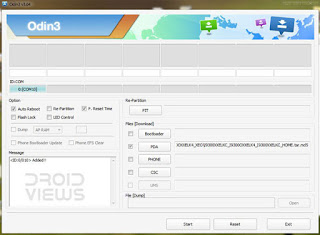
  6. In Odin3 screen, you should see a COM Port number like “0:[COM7]” at ID:COM section and “Added!” text at the message box. This means your device has been detected by Odin3.
  7. Make sure that, only the “Auto Reboot” and “F. Reset Time” options are checked.
  8. Now, extract the downloaded firmware zip file, you’ll find a firmware file with extension .tar.md5
  9. In Odin screen, click on AP button and select the firmware file with .tar.md5 extension (The firmware file look something like: I8552XXDLJ5_I8552ODDDLI7_INU.tar.md5)
  10. Now, click on the Start button to begin the installation process, wait few moments.
  11. Once completed, you would see “PASS!” message in ID:COM port having green background
  12. Your phone should automatically reboot after completion
  13. You can now disconnect your phone from computer
  14. Finish
Congrats! you have completed the tutorial to update Android 4.1.2 Jelly Bean official firmware on Galaxy Win GT-I8552. Hope you successfully done the update process. If you followed everything as mentioned in the above tutorial, then your Galaxy Win should now running on the latest Android 4.1.2 Jelly Bean build version XXANB1. You can confirm the firmware update details from Settings-About Phone. If you stuck in any point or find any issue with the download link, then feel free to contact with us using the comment form below.

Available link for download

Read more »

Thursday, October 6, 2016

Samsung GT B5570 Stock Rom firmware

Samsung GT B5570 Stock Rom firmware


Hello guys welcome to my blog (trickstrickzz.blogspot.com).
HERE
You can Download any Mobile Original(OG) Firmware/Stock Rom.
&
Its free
 So Download your mobile Firmware From Here...
 

 Samsung GT-B5570


Samsung B7560 is gsm &HSPA technology .samsung announced this device on  2011.available in market  2011.7 body weight -97.5grm only.CPU-800mhz(arm-6)&.Card Slot-MicroSD-32gb(upto)&Internal-180mb.RAM-290mb.Primary Camera-2mp&secondary-2mp.OS-Google Android(2.3.6 gingerbred) Battery-1200mah( removable).multi touch-yes,Display TFT display,touch wiz ui touch sensitive ui.Wifi- available.GPS-available....It is very good very value for money product..

Samsung  stock rom download files flash by odin only ..so 1st download odin flasher for samsung...then flash it via odin.


 Download link attached below


 DOWNLOAD

 &
See How to Flash your Phone

1.Download and install Samsung USB Driver on your computer. 


2. Download & extract zip file in your computer..

.
3. Power off your Samsung device.


4. Go to Download mode using vol-&home key&power key.on your Samsung Devices

5.In the Download mode you will be see Download mode.

 
6:-Download & extract Odin on your computer.After Downloading you will be able to see this following files.

7:-Now open Odin 3 &connect your phone to the computer.
8:-Once you have connected phone to the computer,Odin Will automatically recognize device and show added message at the left panel.

.

See full Details how about to flash click here


Available link for download

Read more »

Wednesday, October 5, 2016

Samsung GT P6800 Stock Rom firmware

Samsung GT P6800 Stock Rom firmware


Hello guys welcome to my blog (trickstrickzz.blogspot.com).
HERE
You can Download any Mobile Original(OG) Firmware/Stock Rom.
&
Its free
 So Download your mobile Firmware From Here...


  Samsung GT-P6800

Samsung p6800 is gsm &HSPA technology .samsung announced this device on sept 2011.available in market december 2011.7 body weight -340g only.CPU-1.4ghz(dual core)&Chipset-Exynos.GPU-Mali-400.Card Slot-MicroSD-32gb(upto)&Internal-16/32/64.RAM-1GB.Primary Camera-3.15mp&secondary-2mp.OS-Google Android(3.2 honey comb) Battery-5100mah(non removable)T.The first Tablet using super amoled plus display.and its look gorgeous.And its also first tablet to featured  7.7 screen.


Samsung  stock rom download files flash by odin only ..so 1st download odin flasher for samsung...then flash it via odin.


 Download link attached below


DOWNLOAD

                                     &
               See How to Flash your Phone
 

1.Download and install Samsung USB Driver on your computer.

2. Download & extract zip file in your computer...
 
3. Power off your Samsung device.
 
4. Go to Download mode using vol-&home key&power key.on your Samsung Devices.
 
5.In the Download mode you will be see Download mode.


6:-Download & extract Odin on your computer.After Downloading you will be able to see this following files.

7:-Now open Odin 3 &connect your phone to the computer.
8:-Once you have connected phone to the computer,Odin Will automatically recognize device and show added message at the left panel.


   See full Details about how to flash click here


Available link for download

Read more »

Sunday, October 2, 2016

Samsung Galaxy Mini GT S5570I How to Install S5570IAIMJ1 Android 2 3 6 Gingerbread Firmware

Samsung Galaxy Mini GT S5570I How to Install S5570IAIMJ1 Android 2 3 6 Gingerbread Firmware


Samsung Galaxy Mini GT-S5570I- How to Install S5570IAIMJ1 Android 2.3.6 Gingerbread Firmware,
S5570IAIMJ1 Android 2.3.6 Gingerbread Firmware Last Updated on 24-Feb-2014. Download and install the latest AIMJ1 Android 2.3.6 Gingerbread official firmware on Samsung Galaxy Mini GT-S5570I Smartphone. Samsung recently started rolling out an OTA update about the firmware. The latest firmware build version is S5570IAIMJ1. The Galaxy Mini S5570I was released back in the year 2011 with Android 2.2 Froyo and receiving Android 4.2.2 Jelly Bean from the middle of 2012. There is no news about any Jelly Bean update for the device. If you not yet updated your device to this latest official firmware, then you can now update the same using our simple tutorial below. The below guide will help you to download and install the S5570IAIMJ1 Android 2.3.6 Gingerbread Firmware manually through Odin. You can also check  latest available firmware for your device through OTA (over the air) from Settings-About Phone-Software Update.
 Samsung Galaxy Mini GT-S5570I Firmware Update Guide
If your Galaxy Mini S5570I already running on the Android 2.3.6 Gingerbread, then you can only expect few bug fixes and performance enhancement with this latest firmware update. It is always recommended to update device to the latest available firmware.
So, want to update your Galaxy Mini S5570I to the latest AIMJ1 Android 2.3.6 Gingerbread firmware? For official process, either you can go for OTA update by following the above mentioned path or download and update firmware through the Samsung Kies utility. However, most of us prefer manual way to update official firmware. So, in this article you’ll find step by step manual guide to update the latest Android 2.3.6 AIMJ1 firmware on your Galaxy Mini S5570I through Odin.

Important Note:

“The firmware is released only for the Samsung Galaxy Mini GT-S5570I model, so don’t try this in any other android device. Check your device model number from Settings-About Phone. Also the tutorial is based on Windows PC. Follow all the pre-requisites, procedures and steps carefully to avoid breaking your phone”.

Android 2.3.6 Gingerbread S5570IAIMJ1 Official Firmware Download List

Samsung rolled out the firmware for the following countries. The firmware which are unbranded or not locked to any carrier, no matter of which country or region, can be flashed on any Galaxy Mini GT-S5570I model.Italy (TIM): S5570IAIMJ1_S5570ITIMMJ1_TIM.zip
[Firmware for rest of the countries and carrier will be added here when available]

Pre-Requisites:

  • Check battery percentage, your device should have at least 60% battery power
  • Turn on USB Debugging mode, go to Settings-Developer Options-USB Debugging
  • Backup important data and settings to external storage- follow this guide
  • Install USB driver for your device on your computer- Download Samsung USB Driver

Points to be noted:

  • If you are using any Custom ROM such as- CyanogenMod, Paranoid Android, AOKP, SLIM ROMs etc, then it’ll replaced by this official Stock ROM
  • Custom Recovery (CWM or TWRP Recovery) will be replaced by Stock Recovery
  • After flashing official firmware, your device will no longer belongs to rooted device. However you can root your device any time after flashing the firmware.
All the above pre-requisites are very important and must follow before proceed to installation guide. Hope you get all the above points. Now, go through the below tutorial to install Android 2.3.6 S5570IAIMJ1 official firmware on Galaxy Mini S5570I.

How to Install Android 2.3.6 Gingerbread Official Firmware on Galaxy Mini S5570I through Odin:

Samsung Galaxy Mini GT-S5570I- How to Install S5570IAIMJ1 Android 2.3.6 Gingerbread Firmware
  1. Download Android 2.3.6 AIMJ1 Firmware for Galaxy Mini S5570I from the above list
  2. Download Odin 3.09
  3. Switch off your phone and boot Galaxy Mini S5570I into Download Mode by pressing and holding the Volume Down+Home+Power buttons (long press until the boot screen appear), now press Volume Up key to proceed to Download Mode.
  4. Extract the downloaded Odin3.09 zip file and run the Odin3 v3.09.exe file as an administrator (Right click on the .exe file and click on Run as administrator)
  5. Now connect your Galaxy Mini S5570I to your computer via USB cable
  6. In Odin3 screen, you should see a COM Port number like “0:[COM7]” at ID:COM section and “Added!” text at the message box. This means your device has been detected by Odin3.
  7. Make sure that, only the “Auto Reboot” and “F. Reset Time” options are checked.
  8. Now, extract the downloaded firmware zip file, you’ll find a firmware file with extension .tar.md5
  9. In Odin screen, click on AP button and select the firmware file with .tar.md5 extension (The firmware file look something like: S5570IXXDLJ5_S5570IODDDLI7_INU.tar.md5)
  10. Now, click on the Start button to begin the installation process, wait few moments.
  11. Once completed, you would see “PASS!” message in ID:COM port having green background
  12. Your phone should automatically reboot after completion
  13. You can now disconnect your phone from computer
  14. Finish
Congratulations, your Galaxy Mini S5570I is now updated to the latest and official AIMJ1 Android 2.3.6 Gingerbread firmware. Hope you successfully completed the update process. If you followed everything as mentioned in the above above tutorial, then your your Galaxy Mini should now running on the latest Android 2.3.6 Gingerbread build version AIMJ1. You can confirm the firmware update from Settings-About Phone. So, explore the latest update on your device and share your experience with us and also let us know how you find the above tutorial using the comment section below.

Available link for download

Read more »

Friday, September 30, 2016

Samsung Galaxy Note GT N7000 All 4 1 2 Stock Firmware Download EuropeCountries

Samsung Galaxy Note GT N7000 All 4 1 2 Stock Firmware Download EuropeCountries


Heres the list of available stock ROMs for Samsung Galaxy Note GT-N7000 European versions. This is the original and unmodified stock ROMs that has been officially released via Samsung Kies from first released up to the most latest firmware updates. This files is usable to flash update or downgrade the device firmware to its original factory default firmware settings.

"Note: This firmwares or ROMs are for Samsung Galaxy Note GT-N7000 only, dont ever attempt to flash it to other devices other than the Samsung Galaxy Note GT-N7000. Make sure you always use firmware files which is created from your own country or region to prevent problems and avoid any functionality issues. Type *#1234# on your phone to know the firmware version of your device. Be careful while flashing the device, always proceed with precautionary measures to avoid damaging your phone... You may proceed at your own risk, we are not responsible anything may happen by using these files."

Other Regions Stock ROM:
Asia Firmware | Arabic Middle East Firmware | Africa Firmware

Youll need this for Flashing
Odin Downloader/Flasher - Download
OPS File - Q1-20110914_16GB.pit (only needed for fixing bricked devices, do not use it for restoring to stock or to just unroot your device)
USB Driver - Download 
Flashing instruction guide (see below)


Austria
Galaxy Note: GT-N7000ZBAATO
GT-N7000_ATO_N7000XXLSZ.zip (4.1.2)
GT-N7000_DRE_N7000XXLSZ.zip - Tre (4.1.2)

Baltic States
Galaxy Note: GT-N7000ZBASEB
GT-N7000_SEB_N7000XXLT5.zip (4.1.2)

Belgium
Galaxy Note: GT-N7000ZBAPRO
GT-N7000_PRO_N7000XXLT5.zip (4.1.2)

Bosnia
Galaxy Note: GT-N7000ZBABHT
GT-N7000_BHT_N7000XXLT5.zip - BH-telekom (4.1.2)

Bulgaria
Galaxy Note: GT-N7000ZBABGL
GT-N7000_BGL_N7000XXLT5.zip  BGL (4.1.2)
GT-N7000_GBL_N7000XXLT5.zip  GBL (4.1.2)
GT-N7000_MTL_N7000XXLT5.zip  MTL (4.1.2)

Croatia
Galaxy Note: GT-N7000ZBACRO
GT-N7000_TRA_N7000XXLT5.zip (4.1.2)
GT-N7000_CRG_N7000XXLT5.zip  (4.1.2)
GT-N7000_VIP_N7000XXLT5.zip - Vipnet (4.1.2)
GT-N7000_TWO_N7000XXLT5.zip - O2 (4.1.2)

Cyprus
Galaxy Note: GT-N7000ZBACYO
GT-N7000_CYO_N7000XXLT5.zip (4.1.2)

Czech Republic
Galaxy Note: GT-N7000ZBAXEZ
GT-N7000_XEZ_N7000XXLT5.zip (4.1.2)
GT-N7000_VDC_N7000XXLT5.zip - Vodafone (4.1.2)

France
Galaxy Note: GT-N7000ZBAXEF
GT-N7000_XEF_N7000XXLSZ.zip (4.1.2)
GT-N7000_SFR_N7000XXLT5.zip - SFR (Android 4.1.2)

Germany
Galaxy Note: GT-N7000ZBADBT
GT-N7000_MBC_N7000XXLT5.zip  (4.1.2)

Greece
Galaxy Note: GT-N7000ZBAEUR
GT-N7000_EUR_N7000XXLT5.zip - (4.1.2)
GT-N7000_VGR_N7000XXLT5.zip - Greeece (4.1.2)

Hungary
Galaxy Note: GT-N7000ZBAXEH
GT-N7000_XEH_N7000XXLT5.zip (4.1.2)
GT-N7000_PAN_N7000XXLTA.zip - Telenor (4.1.2)
GT-N7000_TMH_N7000XXLT5.zip - T-Mobile (4.1.2)
GT-N7000_VDH_N7000XXLT5.zip - Vodafone (4.1.2)

Ireland
Galaxy Note: GT-N7000ZBAXEU
GT-N7000_XEU_N7000XXLT9.zip (4.1.2)
GT-N7000_VDI_N7000XXLT9.zip Vodafone (4.1.2)

Italy
Galaxy Note: GT-N7000ZBAITV
GT-N7000_ITV_N7000XXLT9.zip (4.1.2)
GT-N7000_OMN_N7000XXLT5.zip - Vodafone (4.1.2)
GT-N7000_TIM_N7000XXLT5.zip - Italy (4.1.2)

Luxembourg
Galaxy Note: GT-N7000ZBALUX
GT-N7000_LUX_N7000XXLT5.zip (4.1.2)

Macedonia
Galaxy Note: GT-N7000ZBAVIM
GT-N7000_VIM_N7000XXLT5.zip (4.1.2)

Netherlands
Galaxy Note: GT-N7000ZBAXEN
GT-N7000_XEN_N7000XXLT5.zip (4.1.2)

Nordic Denmark, Finland, Iceland, Norway and Sweden
Galaxy Note: GT-N7000ZBANEE
GT-N7000_NEE_N7000XXLT5.zip (4.1.2)

Poland
Galaxy Note: GT-N7000ZBAXEO
GT-N7000_XEO_N7000XXLT9.zip  (4.1.2)

Portugal
Galaxy Note: GT-N7000ZBATCL
GT-N7000_TCL_N7000XXLT5.zip -Vodafone (4.1.2)
GT-N7000_TMN_N7000XXLT5.zip - TMN  (4.1.2)

Romania
Galaxy Note: GT-N7000ZBACOA
GT-N7000_COA_N7000XXLT5.zip - Cosmote (4.1.2)
GT-N7000_CNX_N7000XXLT5.zip - Vodafone (4.1.2)

Russia
Galaxy Note: GT-N7000ZBASER
GT-N7000_SER_N7000XXLSZ.zip  (4.1.2)

Serbia
Galaxy Note: GT-N7000ZBATSR
GT-N7000_TSR_N7000XXLT5.zip  (4.1.2)
GT-N7000_SMO_N7000XXLT5.zip (4.1.2)
GT-N7000_MSR_N7000XXLT5.zip -Telenor (4.1.2)
GT-N7000_TOP_N7000XXLT5.zip -VIP (4.1.2

Slovenia
Galaxy Note: GT-N7000ZBAXSK
GT-N7000_XSK_N7000XXLT5.zip (Android 4.1.2)
GT-N7000_MOT_N7000XXLT5.zip Mobitel (4.1.2)

Spain
Galaxy Note: GT-N7000ZBAPHE
GT-N7000_PHE_N7000XXLT9.zip (4.1.2)
GT-N7000_FOP_N7000XXLT9.zip (4.1.2)
GT-N7000_XEC_N7000XXLT5.zip (4.1.2)

Sweden
Galaxy Note: GT-N7000ZBAHTS
GT-N7000_HTS_N7000XXLT9.zip - 3 ( 4.1.2)

Switzerland
Galaxy Note: GT-N7000ZBAAUT
GT-N7000_AUT_N7000XXLT5.zip  (4.1.2)
GT-N7000_SWC_N7000XXLT9.zip - Swisscom (4.1.2)

Turkey
Galaxy Note: GT-N7000ZBATUR
GT-N7000_TUR_N7000XXLSZ.zip  (4.1.2)

Ukraine 
Galaxy Note: GT-N7000ZBAVHC
GT-N7000_VHC_N7000XXLSZ.zip  (4.1.2)
GT-N7000_SEK_N7000XXLSZ.zip Kyvstar (Android 4.1.2)

United Kingdom 
Galaxy Note: GT-N7000ZBAXEU
GT-N7000_XEU_N7000XXLT9.zip (4.1.2)
GT-N7000_CPW_N7000XXLT9.zip - Carphone (4.1.2)
GT-N7000_ORA_N7000XXLT9.zip - Orange  (4.1.2)
GT-N7000_VOD_N7000XXLT9.zip Vodafone (4.1.2)

Ill just added Australia and New Zealand!

Australia
Galaxy Note: GT-N7000ZBAXSA
GT-N7000_XSA_N7000XXLT6.zip (4.1.2)
GT-N7000_OPS_N7000XXLSZ.zip Optus  (4.1.2)

New Zealand
Galaxy Note: GT-N7000ZBAVNZ
GT-N7000_VNZ_N7000XXLSZ.zip (4.1.2)

How to Manually Install Stock ROMs or Flash on Samsung Galaxy Note N7000
How to set Samsung Galaxy note N7000 in Download mode with button combination

How to flash Samsung Galaxy note N7000 stock ROM firmware with PIT BOOTLOADER PDA MODEM and CSC in ODIN


Available link for download

Read more »

Samsung GT S5360 Stock Rom firmware

Samsung GT S5360 Stock Rom firmware


 Hello guys welcome to my blog (trickstrickzz.blogspot.com).
HERE
You can Download any Mobile Original(OG) Firmware/Stock Rom.
&
Its free
 So Download your mobile Firmware From Here...


 Samsung GT-S5360

Samsung s5360 is gsm &HSPA technology .samsung announced this device on  2011.available in market  2011.7 body weight -97.5grm only.CPU-800mhz(arm-6)&.Card Slot-MicroSD-32gb(upto)&Internal-180mb.RAM-290mb.Primary Camera-3.15mp&secondary-2mp.OS-Google Android(2.3.6 gingerbred) Battery-1200mah( removable).multi touch-yes,Display TFT display,touch wiz ui touch sensitive ui.Wifi- available.GPS-available....It is very good very value for money product..


Samsung  stock rom download files flash by odin only ..so 1st download odin flasher for samsung...then flash it via odin.


 Download link attached below


DOWNLOAD 

                                       &
                  See How to Flash your Phone

1.Download and install Samsung USB Driver on your computer.

2. Download & extract zip file in your computer...

3. Power off your Samsung device.

4. Go to Download mode using vol-&home key&power key.on your Samsung Devices.


5.In the Download mode you will be see Download mode.

 
6:-Download & extract Odin on your computer.After Downloading you will be able to see this following files.

7:-Now open Odin 3 &connect your phone to the computer.
8:-Once you have connected phone to the computer,Odin Will automatically recognize device and show added message at the left panel.


   See full Details how about to flash click here


Available link for download

Read more »

Sunday, September 25, 2016

Samsung Galaxy Ace II GT I8160 Restore Factory Hard Reset Remove Pattern Lock

Samsung Galaxy Ace II GT I8160 Restore Factory Hard Reset Remove Pattern Lock


Samsung Galaxy Ace II GT-I8160 Restore Factory Hard Reset Remove Pattern Lock
It will remove all the data ,contacts and apps that you installed
Samsung Galaxy Ace II GT-I8160 Restore Factory Hard Reset Remove Pattern Lock
Before Performing The Hard Reset:
- In Case Your Samsung Mobile Phone Can Connect To A Computer Then It Is Better To Make A Backup Of Your Saved Data Using Samsung Kies Software.
- But In Case That Is Not Possible Then You Can Check That Your Phone’s Battery Has Enough Charging, Otherwise You Should Charge It.
Samsung Galaxy Ace II GT-I8160 Hard Reset Steps:
- Take Out Your Phone’s Battery, SIM-card And Memory Card Too.
- After 10 Seconds Put The Battery Back Into Your Phone.
- Press And Hold Volume Up Key + Home Key Then Press Power Key.
- Keep Pressing The Above Keys Until Samsung Logo Appears,Then Release All Keys.
- You Will Get Factory Reset / System Recovery Menu On Screen.
- Use Volume Down Key To Select Wipe Data / Factory Reset Option.
- Use Home Key To Confirm The Operation.
- You Need To Use The Volume Down Key Again To Select "Yes — Delete All User Data"
- Use Home Key To Confirm.
- After Performing The Hard Reset, Select Reboot System Now Option, And Confirm It Using Home Key.
- Now The Phone Will Reboots, Wait For It To Be Fully On And Then You Can Start Using It.
Notice: The Hard Reset / Factory Reset Operation Will Delete Anything That Are Saved In Your Phone’s Internal Memory, So Make A Backup Of Your Data In Case You Can Access Them.
Samsung Galaxy Ace II GT-I8160 Restore Factory Hard Reset Format Phone.So lets start the Samsung Galaxy Ace II GT-I8160 Restore Factory, Samsung Galaxy Ace II GT-I8160 Hard Reset.Turn Off the mobile phone for few mints.Samsung Galaxy Ace II GT-I8160 Remove Pattern Lock.

Available link for download

Read more »

Saturday, September 24, 2016

Samsung Galaxy Fame GT S6810B How to Install S6810BVJANA1 Android 4 1 2 Jelly Bean Firmware

Samsung Galaxy Fame GT S6810B How to Install S6810BVJANA1 Android 4 1 2 Jelly Bean Firmware


S6810BVJANA1 Android 4.1.2 Jelly Bean Firmware Last Updated on 26-Feb-2014. Samsung Galaxy Fame GT-S6810B users can now update their device with the latest official VJANA1 Android 4.1.2 Jelly Bean firmware. Samsung recently started rolling out an OTA update about the firmware. The latest firmware build version is S6810BVJANA1. The Galaxy Fame was released in the month of February 2013 with Android 4.1.2 Jelly Bean. Samsung is yet to release Android 4.2.2 Jelly Bean or any further android version for the device. If you own the device and not yet updated this latest firmware, then update the same using our simple tutorial below. The below guide will help you to download and install the S6810BVJANA1 Android 4.1.2 Jelly Bean Firmware manually through Odin. You can also check latest available firmware for your device through OTA (over the air) from Settings-About Phone-Software Update.
Samsung Galaxy Fame GT-S6810B- How to Install S6810BVJANA1 Android 4.1.2 Jelly Bean Firmware copy
As the Galaxy Fame already running on the Android 4.1.2 Jelly Bean, you can only expect few bug fixes and performance enhancement with this update. So, want to update your Galaxy Fame S6810B to the latest VJANA1 Android 4.1.2 Jelly Bean firmware? To install in official way, either you can go for OTA update as mentioned above or download firmware through the Samsung Kies utility. However, most of us prefer manual way to update official firmware. So, in this article you’ll find step by step manual guide to update the latest Android 4.1.2 VJANA1 firmware on your Galaxy Fame S6810B through Odin.

Important Note:

“The firmware is released only for the Samsung Galaxy Fame GT-S6810B model, so don’t try this in any other android device. Check your device model number from Settings-About Phone. Also the tutorial is based on Windows PC. Follow all the pre-requisites, procedures and steps carefully to avoid breaking your phone”.

Android 4.1.2 Jelly Bean S6810BVJANA1 Official Firmware Download List

Samsung rolled out the firmware for the following countries. The firmware which are unbranded or not locked to any carrier, no matter of which country or region, can be flashed on any Galaxy Fame GT-S6810B model.
Brazil (VIVO):
S6810BVJANA1_S6810BZVVANA1_ZVV.zip  |  ZVV-S6810BVJANA1-20140226112604.zip
[Firmware for rest of the countries and carrier will be added here when available]

Pre-Requisites:

  • Check battery percentage, your device should have at least 60% battery power
  • Turn on USB Debugging mode, go to Settings-Developer Options-USB Debugging
  • Backup important data and settings to external storage- follow this guide
  • Install USB driver for your device on your computer- Download Samsung USB Driver

Points to be Noted:

  • If you are using any Custom ROM such as- CyanogenMod, Paranoid Android, AOKP, SLIM ROMs etc, then it’ll replaced by this official Stock ROM
  • Custom Recovery (CWM or TWRP Recovery) will be replaced by Stock Recovery
  • After flashing official firmware, your device will no longer belongs to rooted device. However you can root your device any time after flashing the firmware.
All the above pre-requisites are very important and must follow before proceed to installation guide. Hope you get all the above points. Now, go through the below tutorial to install Android 4.1.2 S6810BVJANA1 official firmware on Galaxy Fame S6810B.

How to Install Android 4.1.2 Jelly Bean Official Firmware on Galaxy Fame S6810B through Odin:

Samsung Galaxy Fame GT-S6810B- How to Install S6810BVJANA1 Android 4.1.2 Jelly Bean Firmware
  1. Download Android 4.1.2 VJANA1 Firmware for Galaxy Fame S6810B from the above list
  2. Download Odin 3.09
  3. Switch off your phone and boot Galaxy Fame S6810B into Download Mode by pressing and holding the Volume Down+Home+Power buttons (long press until the boot screen appear), now press Volume Up key to proceed to Download Mode.
  4. Extract the downloaded Odin3.09 zip file and run the Odin3 v3.09.exe file as an administrator (Right click on the .exe file and click on Run as administrator)
  5. Now connect your Galaxy Fame S6810B to your computer via USB cable
  6. In Odin3 screen, you should see a COM Port number like “0:[COM7]” at ID:COM section and “Added!” text at the message box. This means your device has been detected by Odin3.
  7. Make sure that, only the “Auto Reboot” and “F. Reset Time” options are checked.
  8. Now, extract the downloaded firmware zip file, you’ll find a firmware file with extension .tar.md5
  9. In Odin screen, click on AP button and select the firmware file with .tar.md5 extension (The firmware file look something like: S6810BXXDLJ5_S6810BODDDLI7_INU.tar.md5)
  10. Now, click on the Start button to begin the installation process, wait few moments.
  11. Once completed, you would see “PASS!” message in ID:COM port having green background
  12. Your phone should automatically reboot after completion
  13. You can now disconnect your phone from computer
  14. Finish
Congrats! you have just completed the tutorial to update Android 4.1.2 Jelly Bean official firmware on Galaxy Fame GT-S6810B. Hope you successfully done the update process. If you followed everything as mentioned in the above tutorial, then your Galaxy Fame should now running on the latest Android 4.1.2 Jelly Bean build version VJANA1. You can confirm the firmware update details from Settings-About Phone. If you stuck in any point or find any issue with the download link, then feel free to contact with us using the comment form below.

Available link for download

Read more »

Friday, September 23, 2016

samsung S2 GT T989 stock rom firmware

samsung S2 GT T989 stock rom firmware


Samsung stock rom downloaded files flash by odin only ..so 1st download odin flasher for samsung...then flash it via odin.


 Download link attached below


DOWNLOAD


Available link for download

Read more »

Wednesday, September 21, 2016

Samsung Galaxy Note 2 GT N7100 Simple Tutorial Root N7100UBDMH1 Android 4 1 2 Jelly Bean Firmware

Samsung Galaxy Note 2 GT N7100 Simple Tutorial Root N7100UBDMH1 Android 4 1 2 Jelly Bean Firmware


Samsung Galaxy Note 2 GT-N7100- Simple Tutorial Root N7100UBDMH1 Android 4.1.2 Firmware,A simple method to root N7100UBDMH1 Android 4.1.2 Jelly Bean Firmware is now available at NasirTech. Samsung Galaxy Note 2 GT-N7100 recently get updated to the N7100UBDMH1 4.1.2 Jelly Bean Firmware. If you yet to update the firmware, then update the same by following the above link. Hope you updated this latest firmware on your device and now you can root the UBDMH1 firmware using our simple tutorial below. The below guide will help you to root N7100UBDMH1 4.1.2 Jelly Bean Firmware running on Galaxy Note 2 GT-N7100. Continue reading the tutorial for complete guide.
After updating official firmware, your device no longer belongs to rooted device. So, after official firmware update, many of us prefer to root our device to enjoy some additional features that unrooted android device doesn’t offer. With a rooted android device, you can install apps that ask root permission, flash various custom ROMs, install MODs and tweak various features. Root removes default bloatware apps that free-up lots of memory space and extend the battery life. However, once rooted, manufacturer warranty will be void. But you can regain the warranty by following proper unroot process. To know more about benefits of rooting android device, read- Complete Note on What is Rooting and Benefits of Rooting Android Phone.
Samsung Galaxy Note 2 GT-N7100- Simple Tutorial Root N7100UBDMH1 Android 4.1.2 Firmware
So, want to root Galaxy Note 2 GT-N7100 Running N7100UBDMH1 4.1.2 Jelly Bean Firmware? Continue reading this page to get all the necessary steps to successfully root your device. The root file (CF-Auto-Root) we used in this tutorial is safe and have nearly 100% success rate. We’ll use Odin software to flash the root file.
The tutorial is made with simple step by step guide, so that even an android newbie user can follow and successfully root his/her device. However, in this process you may loss your personal data and settings. So, we recommend you to follow all the backup instructions before proceed to rooting guide.

Warning!

  • This rooting tutorial is only applicable for Samsung Galaxy Note 2 GT-N7100 model (t03g). So, don’t try this in any other android device. Check your device model number from- Settings-About Phone.
  • Rooting voids your phone’s manufacturer warranty. However, you can get back the warranty anytime by following proper unroot process or by flashing official firmware.
  • This guide is for educational purpose and you should try this at your own risk. We are not responsible if your device experience a soft brick after following this tutorial.

Pre-Requisites:

  • Check battery percentage, charge your device to a decent level of at least 60% battery power. Your device should not turn off during installation.
  • Turn on USB Debugging mode, go to Settings-Developer Options-USB Debugging
  • Backup important data and settings to external storage- follow this guide
  • Install USB driver for your device on your computer- Download Samsung USB Driver
All the above pre-requisites are very important and must be followed before proceed to installation guide. Hope you get all the above points and done as mentioned. Now, you are ready to move to the final step of this tutorial where we have arranged a step by step details guide to root Galaxy Note 2 GT-N7100 running  N7100UBDMH1 4.1.2 Jelly Bean firmware.

Steps to Root Galaxy Note 2 GT-N7100 Running N7100UBDMH1 4.1.2 Jelly Bean through Odin:

Samsung Galaxy Note 2 GT-N7100- Simple Tutorial Root N7100UBDMH1 Android 4.1.2 Firmware
  1. Download CF-Auto-Root for Galaxy Note 2 N7100 and extract the Zip file: CF-Auto-Root-t03g-t03gxx-gtn7100.zip
  2. Download Odin 3.09 and extract the Zip file: Odin3_V3.09.Zip
  3. Now, Switch off your phone and boot Galaxy Note 2 N7100 into Download Mode by pressing and holding the Volume Down+Home+Power buttons together (long press until the boot screen appear), now press Volume Up key to proceed to Download Mode.
  4. Run the Odin3 v3.09.exe file as an administrator (Right click on the .exe file and click on Run as administrator)
  5. Now connect your Galaxy Note 2 N7100 to your computer via USB cable
  6. In Odin3 screen, you should see a COM Port number like “0:[COM7]” at ID:COM section and “Added!” text at the message box. This means your device has been detected by Odin3.
  7. Make sure that, only the “Auto Reboot” and “F. Reset Time” options are checked.
  8. Now, click on the AP button and select the CF-Auto-Root-t03g-t03gxx-gtn7100.tar.md5 file.
  9. Finally, click on the Start button to begin the rooting process, wait few moments.
  10. Once completed, you would see “PASS!” message in ID:COM port having green background
  11. Your phone should automatically reboot after completion
  12. You can now disconnect your phone from computer
  13. Finish
Congrats! You have completed the tutorial to root Galaxy Note 2 N7100 running N7100UBDMH1 4.1.2 Jelly Bean Firmware. Hope you successfully done the rooting process. If you followed everything as mentioned in the above tutorial, then your Galaxy Note 2 N7100 should now rooted and you have complete control over your device. Now, install apps that ask root permission or flash various custom ROMs. To verify your device is rooted or not, you can download and run the Root Checker App from Google Play Store. If you have any doubt or query about the tutorial, feel free to contact with us using the comment form below, and share your rooting experience with us.

Available link for download

Read more »